
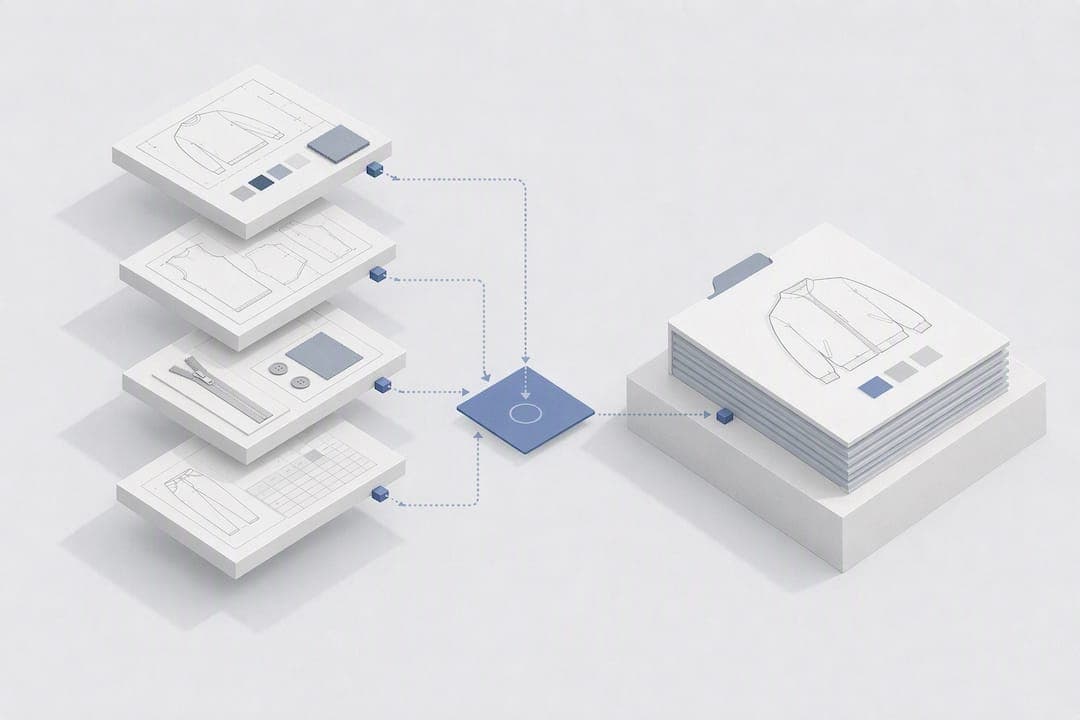
To design your own clothes for production, you need one deliverable: a complete, factory-ready tech pack. That means technical flats, a bill of materials, a point-of-measure chart with tolerances, construction notes, a cost sheet and a revision log, all sitting inside a single, version-controlled document. Miss one of those pieces and a factory either guesses or stops to ask you, and both cost you time. Tools like WOVA now let you go from a written idea to a complete export without stitching the file together by hand.
TL;DR:
- A complete tech pack must include technical flats, a bill of materials, a point-of-measure chart with tolerances, construction notes, a cost sheet, and a revision log to avoid factory misinterpretation.
- Properly specifying measurement points, fabric details, and trim codes significantly reduces first-sample rejections caused by unclear or vague specifications.
- Using dedicated tech-pack tools or AI platforms like WOVA can streamline the process, generate linked exports, and minimize errors by keeping all details in one editable file.
- Factories often review specs on mobile devices, so exporting a PDF version and confirming it displays correctly can prevent overlooked issues during sampling.
- Expect a manufacturing cycle involving multiple sampling rounds, with the pre-production sample serving as the official contract before bulk production begins.
Table of Contents
- What steps take you from idea to manufacturer-ready tech pack?
- What must each section of a tech pack contain?
- Which tools actually speed up building a tech pack?
- What checks catch mistakes before the factory sees them?
- Why owning the tech pack matters more than the sketch
- Try exporting your first tech pack with WOVA
- Sources
- FAQ
What steps take you from idea to manufacturer-ready tech pack?
Designing a garment for production is not the same skill as sketching one. It is a sequence, and skipping steps is exactly why so many first samples come back wrong. Here is the order that actually works, whether you are building the pack by hand or exporting it from a platform.
- Define your silhouette and fabric intent. Decide the fit, the drape, and the fabric weight (GSM) before you draw anything. A factory quoting a "cotton tee" with no GSM specified will assume a weight that may not match your vision at all.
- Create vector technical flats. Front, back and side views, plus close-ups on anything unusual, like a hidden placket or a raglan seam.
- Assemble your bill of materials. Every fabric, trim, thread and label, each with a supplier reference and a Pantone code where colour matters.
- Build the POM chart. List every point of measure, set your base size, and write down grading rules for the sizes above and below it.
- Write construction notes. Stitch types, seam allowances, finishing details, anything a pattern cutter or sewing line needs to interpret the design correctly.
- Estimate your costs. Break down material cost and cut-make-trim (CMT), then set a target FOB (free on board) price you can defend in factory negotiations.
- Run a consistency check. Cross-reference the BOM against the flats and the POM chart before you freeze the file as a version.
- Prepare for sampling. A proven production roadmap runs design, then tech pack, then sampling, then bulk, and you should expect more than one sampling round before anything ships.
That eighth step trips people up the most. Designers often treat the tech pack as the finish line, when it is really the starting gun for a back-and-forth that can run three or four rounds before a factory locks production.
What must each section of a tech pack contain?
A tech pack works because every section removes a question the factory would otherwise have to ask. The core components are technical flats, a BOM, a POM chart, construction notes, a cost sheet and a revision log, and each one has its own non-negotiable detail level.
- Technical flats: front, back and side views as vector drawings, not photographs or raster sketches, with callout lines pointing to stitch lines, hardware and trims. Vector files scale cleanly for cutting and grading; a JPEG does not.
- Bill of materials: exact fibre content, GSM, supplier codes, trim specifications and Pantone references for every component, right down to thread colour.
- POM chart: every measurement point named and numbered, units stated, a base size chosen, grading rules for other sizes, and a tolerance range attached to each figure (commonly a fraction of a centimetre either way, though this varies by garment type).
- Construction notes: seam types, stitch counts per inch, seam allowances, and any reinforcement or finishing detail that affects durability.
- Decoration and artwork: embroidery or print files delivered as vector formats (.ai or .eps), with placement measured from a fixed reference point like HPS (high point shoulder) or centre chest.
- Labels and packaging: folding instructions, label placement and any polybag or hangtag specification the purchase order requires.
- Cost sheet: material cost, CMT, and your target FOB, laid out so a factory can quote against it line by line.
- Revision log: version number, date, and who approved the change, using a consistent naming pattern.
Unclear or missing measurement specifications cause a large share of first-sample rejections, according to research cited by Techpacker. That single statistic explains why the POM chart deserves more attention than most new designers give it. A documented colourway with an exact Pantone reference, ideally backed by a physical swatch or lab dip, closes off the other major source of factory guesswork: colour interpreted differently on every screen it's viewed on.
Which tools actually speed up building a tech pack?
You can build a tech pack with a spreadsheet for the BOM and POM chart alongside a design tool for flats, or you can use a dedicated tech-pack platform that keeps everything in one file. Format matters less than completeness and version control, but the workflow you choose changes how many mistakes slip through.
Split workflows, where flats live in Illustrator and specs live in a separate Excel file, create a specific failure mode: someone updates a measurement in the spreadsheet and forgets to update the callout on the flat. Purpose-built tech-pack tools bundle flats, BOM tables, measurement charts and annotation into one interface precisely to close that gap.
Starting from a template for your garment category, a basic tee, a woven trouser, a technical jacket, saves real time because the relevant POMs are already listed. You extend it with garment-specific details rather than building a chart from a blank page each time.
An AI-assisted platform can compress that whole sequence: you describe the garment idea, and it generates a sketch, annotated technical flats, a BOM and a POM chart as a linked export rather than four separate files you assemble by hand. That single-file approach is also where the One Live Version rule earns its keep: keep one editable master, export a read-only PDF for the factory, and name files consistently, something like Brand_Style_TechPack_V1_20260214, to stop an old version being mistaken for the current one.
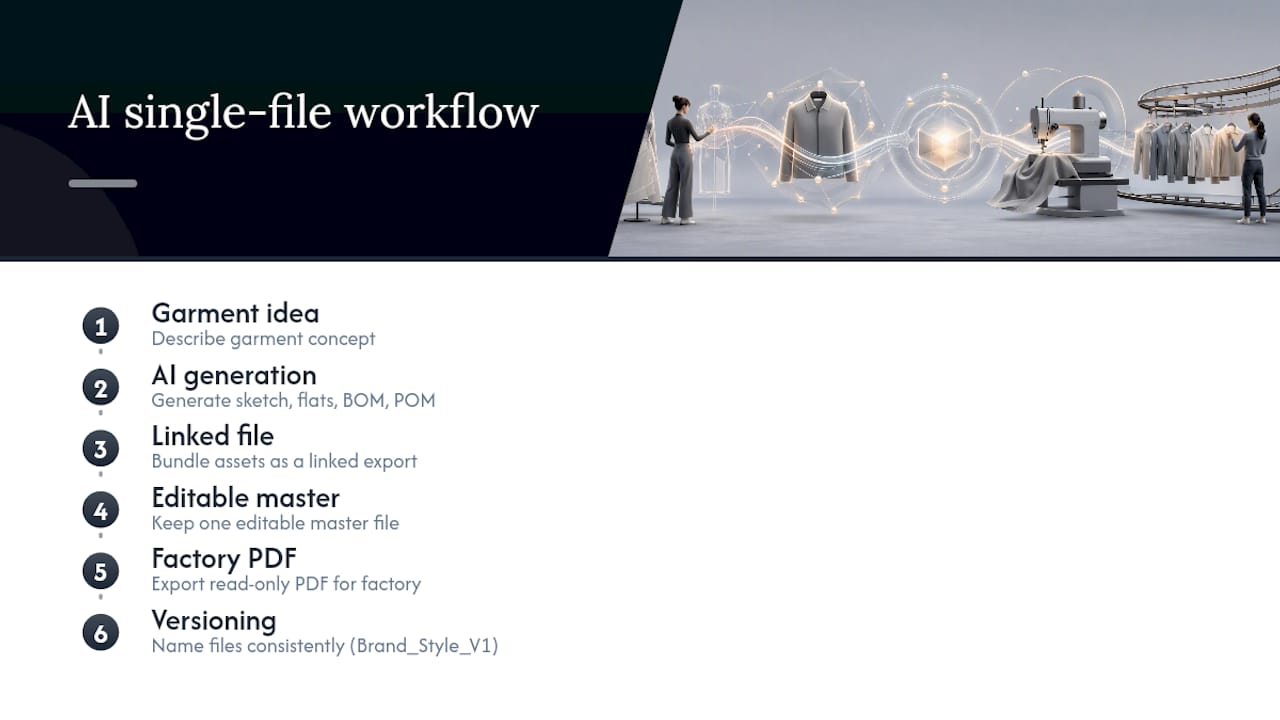
Pro Tip: Before you send anything to a factory, export a PDF and check it opens correctly on a phone. Factories often review specs on mobile between calls, and a flat that renders as a scrambled mess in that context gets skimmed, not read.
If your BOM includes custom trims or embroidered patches, sourcing them from a dedicated trim and patch supplier gives you a specific product code to write into the BOM rather than a vague description a factory has to interpret.
What checks catch mistakes before the factory sees them?
Run a short consistency pass before any file leaves your hands. Confirm every BOM line item appears somewhere on the flats, every POM has a labelled callout on the sketch, and every artwork file attached is vector, not a screenshot.
The mistakes that cause delays are almost always the same handful:
- Missing tolerances on the POM chart, leaving the factory to guess how much variance is acceptable.
- Vague material descriptions ("soft cotton") instead of fibre content and GSM.
- Trims listed without supplier codes, which invites unapproved substitutions.
- No back or side flat view, so construction details on the reverse are left to interpretation.
When a sample comes back wrong, feedback works best when it's measurement based: a photo annotated with the actual distance and the POM reference number beats a comment like "the sleeve looks too long." Expect several sampling rounds, proto, fit, then pre-production, before anything is cleared for bulk. The pre-production or "PP" sample, sealed and signed off against your AQL (acceptable quality limit) standard, functions as the actual contract for what bulk production must match.
Why owning the tech pack matters more than the sketch
The sketch gets the attention, but the tech pack is where quality and cost actually get decided. Hand that responsibility to a factory and you hand over control of measurements and materials along with it, often without realising it until the bulk shipment doesn't match what you imagined.
Creative iteration and production discipline pull in different directions, and small brands often resolve that tension badly, either over-designing a pack nobody at the factory reads properly, or under-specifying one and hoping goodwill fills the gaps. Neither works reliably at scale.
This is exactly the gap that some AI-powered platforms aim to close: giving independent designers and small teams a way to produce a properly specified pack without years of technical design training behind them.
— WOVA Editorial Team
Try exporting your first tech pack with WOVA
Some AI platforms turn a written garment description into a complete design concept, sketches, annotated technical flats, a bill of materials and a manufacturer-ready tech pack, without you needing to assemble each piece separately.

If you have an idea sitting in a notes app or a rough sketch on paper, the fastest way to see what a factory-ready pack looks like is to run it through the platform yourself. A trial feature may let you generate an export, complete with vector flats, BOM and POM chart, in a single-file format, so you can compare it directly against whatever spreadsheet-and-Illustrator process you're using now. Start a free trial on WOVA and export your first tech pack to see how much of that manual assembly it removes.
Sources
For deeper technical detail beyond this guide, Techpacker's complete tech pack guide and Bryden Apparel's factory guide cover template structures and Pantone referencing in more depth.
- What Is a Tech Pack? A Guide for DTC Brands
- How To Manufacture Clothing? Proven Roadmap From Experts
- Clothing Tech Pack Guide: What to Include for Manufacturing
- Tech Packs: The Definitive Factory Guide | Bryden Apparel
FAQ
What is a tech pack in fashion design?
A tech pack is the specification document that tells a manufacturer exactly how to produce a garment, covering flats, measurements, materials, construction and cost in one file.
Do I need a tech pack to design my own clothes for production?
Yes. Sketches alone don't give a factory enough information to cut, sew or cost a garment accurately, which is why a complete tech pack with BOM and POM data is the standard production deliverable.
How many measurement points should a POM chart include?
It varies by garment category, but every point that affects fit, hem length, chest width, sleeve length, and so on, needs its own labelled entry with a stated tolerance range.
What causes most first-sample rejections?
Unclear or missing measurement specifications cause a large share of first-sample rejections, which is why the POM chart deserves as much care as the flats.
Can AI tools like WOVA create a factory-ready tech pack?
WOVA generates sketches, annotated technical flats, a BOM and a POM chart from a written garment description, producing a single-file export designed for factory submission.